LOCAL IRONMON COMPANION

Follow every step.
Leave the game untouched.

A live Pokédex, Hall of Fame, maps, moveset analysis, Tier List, and Monaris collection in one local interface built for IronMON runs.

Windows 64-bitHGSS · Platinum · BW2Local data

APP PREVIEW

See the interface before installing

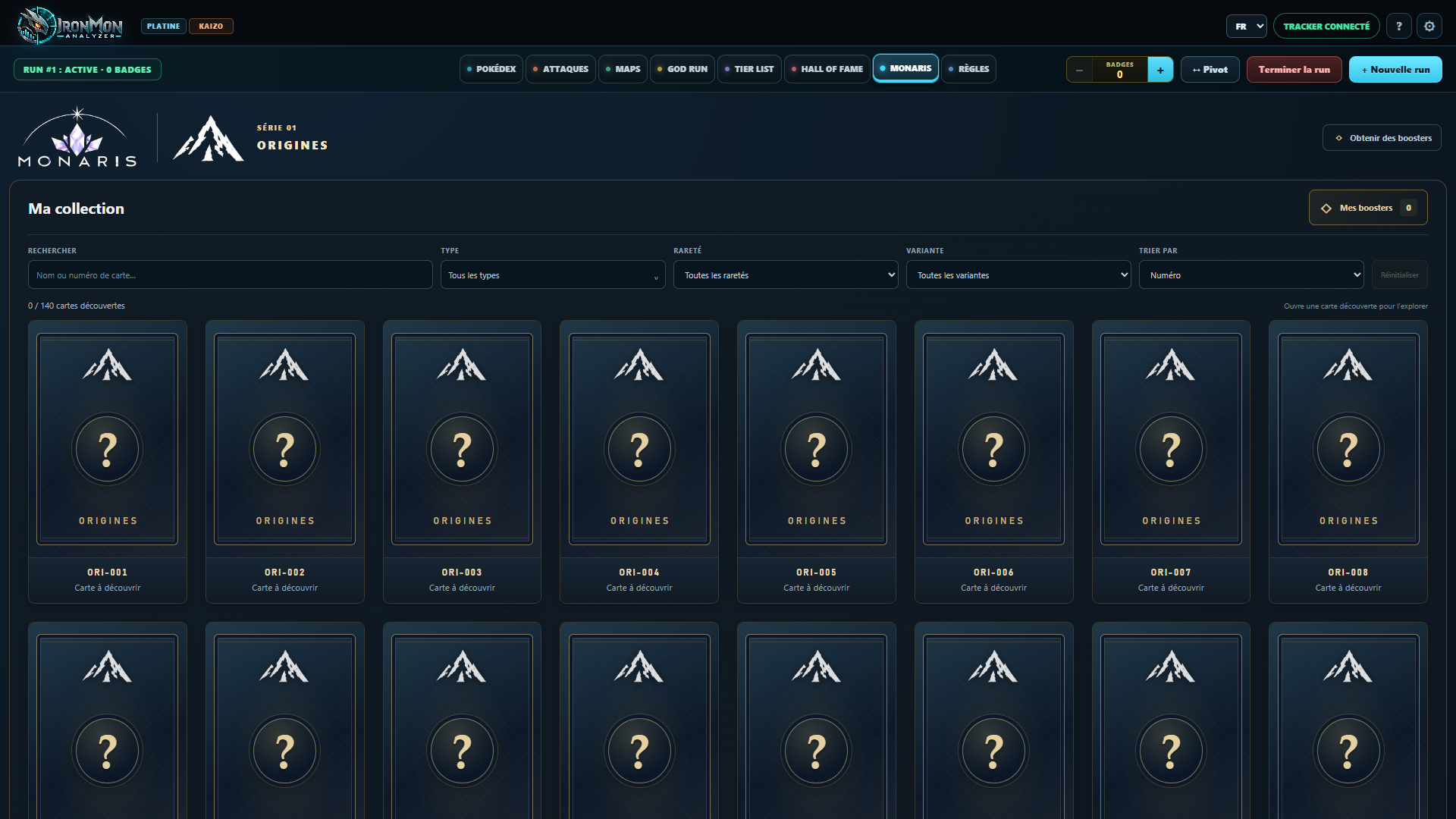
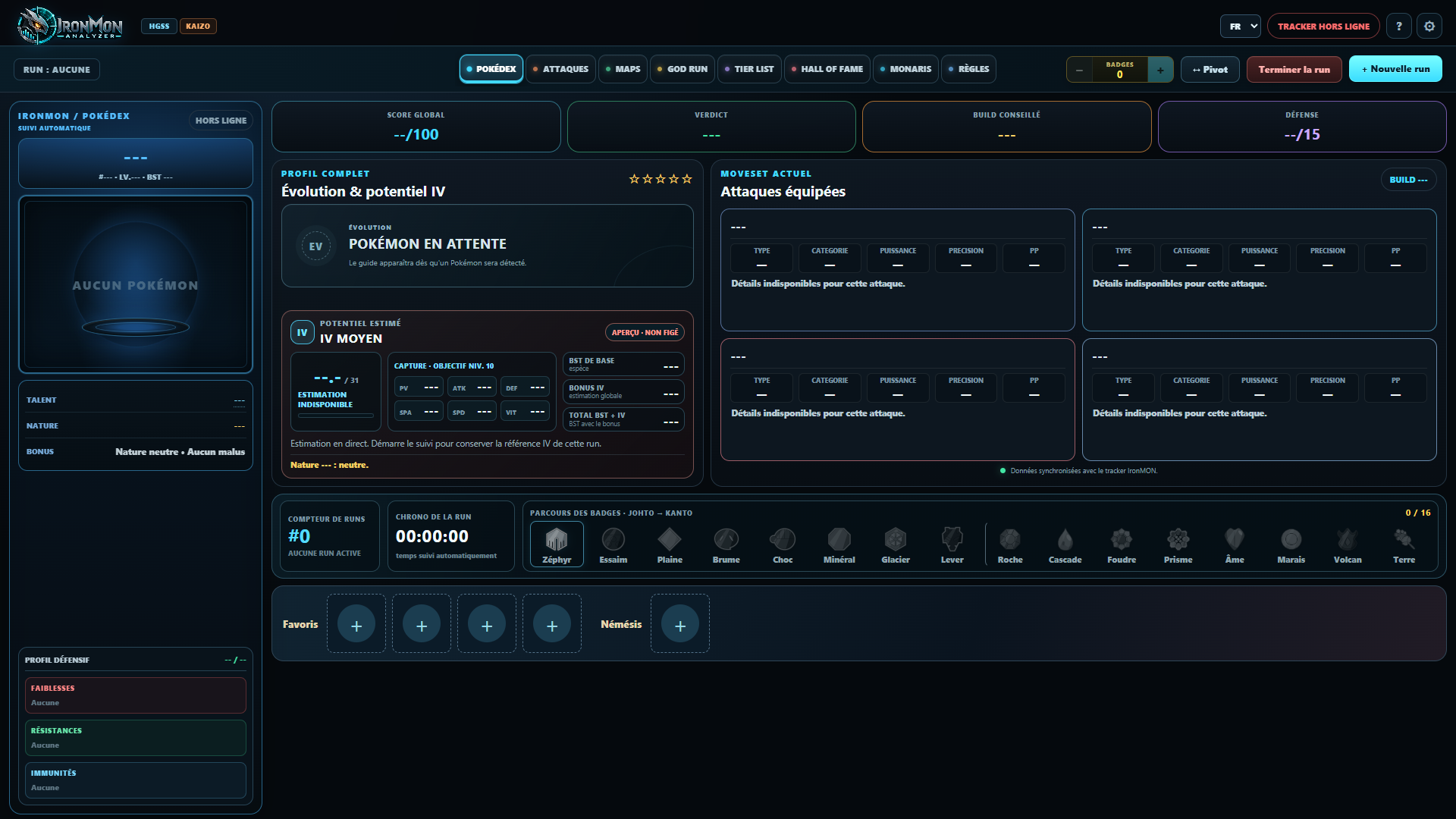
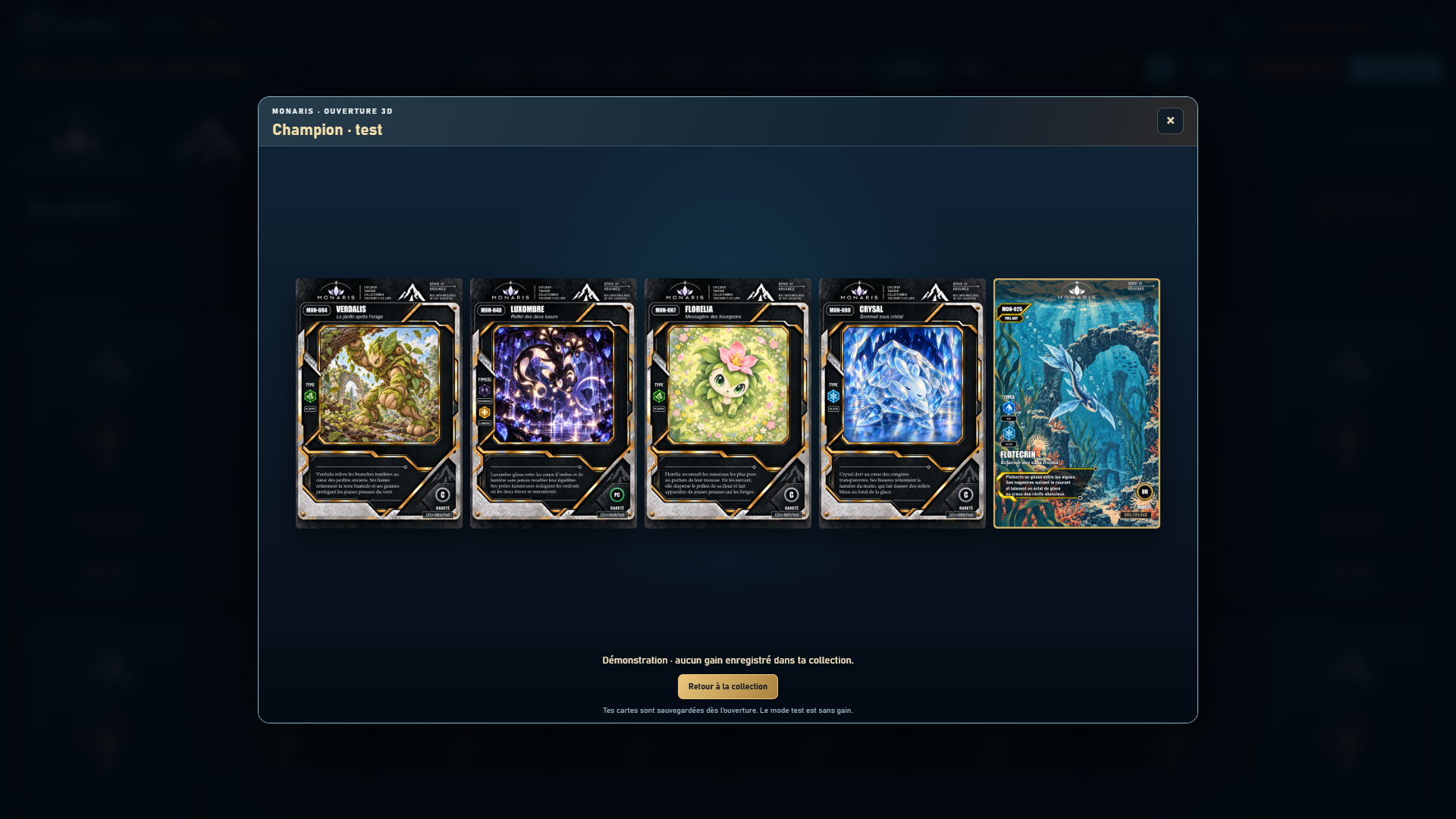
Fresh captures from an isolated demo profile, with no game sprites shown: the Monaris album, the waiting interface, and a booster opening.

Monaris album with undiscovered cards hidden
An album to completeUnowned cards remain hidden.
IronMON Analyzer before a run starts, with no Pokémon displayed
A home for your runProfile, moves, badges, and favorites together.
Five cards revealed during a Monaris demo booster opening
The thrill of discoveryFive cards revealed after opening a booster.

Monaris · A little reward for your progress: reach milestones during your runs, earn boosters and discover cards to collect. Build your album as you play… and much more to come.

INSTALLATION

Start in the right order

IronMON Analyzer uses data sent by the tracker. Install and check the emulator and tracker before installing Analyzer.

!
Important: follow the installation guide in order.

Start with a working game and tracker, then connect Analyzer. The full guide walks you through each step.

Click a step to see its instructions.

01Prepare the game

Install BizHawk and its prerequisites. If your format requires a patch, apply it to your compatible game copy before starting.

Official BizHawk releases ↗The guide covers patching, Randomizer ZX, and the first save.
02Install the tracker

NDS IronMON Tracker covers HGSS, Platinum, and Black 2 / White 2. Set up quick load with the ROM, Randomizer ZX, and game settings.

Download the tracker ↗Read the official instructions ↗Keep the script and “ironmon_tracker” folder together.
03Check the tracker

Start your game and confirm that the tracker displays the Pokémon, level, stats, moves, and badges.

Continue only when the tracker is working correctly.
04Install Analyzer

Download the Windows installer, start IronMON Analyzer, and check that the Tracker status turns online.

Python and Git are not required.

These links open the creators’ projects. Download IronMON Analyzer below.

Release notes, SHA-256 and component sources

WINDOWS INSTALLER

IronMON Analyzer 1.0.0

64-bit Windows · 721.95 MB · Free. The installer is not digitally signed; Windows may show a warning. Understand the Windows warning

Download for Windows
Installation and getting-started guideTracker, switching games, pivoting, badges, and troubleshooting step by step.

Check that everything is connected

FIRST LAUNCH

  1. Start the gameOpen a legally obtained game copy prepared for your format, then start playing.
  2. Start the trackerWait until it displays the correct Pokémon and information before opening Analyzer.
  3. Open IronMON AnalyzerThe application starts locally and opens its interface in your browser.
  4. Check the Tracker statusIt should turn online, and the Pokédex should match the tracker data.
  5. If something is wrongCheck the tracker setup first, then use Advanced diagnostics in Settings.

INSIDE THE APP

A companion for the whole run

01Live Pokédex

Types, ability, nature, stats, resistances, and estimated IV potential in one place.

02Moves

Test a moveset, compare physical and special options, and plan a replacement.

03Maps

Browse available maps, zoom in, and quickly find useful items and landmarks.

04Hall of Fame

Archive defeats, resets, and victories with progress, duration, location, and trainer.

05Tier List

Build a personal ranking for each game and add ability requirements.

06Monaris

Discover the original collection connected to IronMON Analyzer and grow your album.

AN INDEPENDENT PROJECT

Built by one person

I develop IronMON Analyzer on my own to make your playthroughs easier to follow. I haven’t thought of everything: every piece of feedback helps me improve the app. Thank you for your patience; updates may not follow a regular schedule.

YOUR FEEDBACK

Help me make it better

Found a bug, have an idea, or noticed something awkward during a playthrough? All feedback is welcome.

Which games would you like to see in the app, including games without Kaizo? Would you like tracking for other modes or challenges? Email me with the game, mode, and information you would like to track. Your suggestions will help shape future development.

Email [email protected] ↗
OPTIONAL SUPPORT

Support the project

Your support helps fund website hosting, app downloads and IronMON Analyzer’s development tools. Donations are optional: the app remains free for everyone, with no donor-only benefits.

Support via PayPal ↗Optional · Payment on PayPal’s website · No in-app advantages

HELP

Common questions

Will downloads be counted?

A counter totals download starts per day and version, without individual identifiers in its database. File checks and partial resumes are excluded. This is not a count of unique people, successful installations or completed transfers: one person may download several times, and tools that only use segmented requests may be undercounted. Downloads are open; the counter measures download starts.

Analyzer says “Tracker offline.” What should I do?

First check that the game is running and NDS IronMON Tracker is working. Analyzer relies on the tracker's export and cannot invent missing data. Then open Advanced diagnostics in Settings.

Do I need to install Python or Git?

No. The public Windows installer will include everything the application needs.

Does IronMON Analyzer include an emulator or ROM?

No. The emulator, tracker, and game are separate. Analyzer only reads data exported by the tracker.

Will an update delete my runs?

User data is kept outside the installation folder, so an update or reinstall should preserve your runs.

What if the displayed Pokémon is wrong?

Compare the Pokémon in the game and tracker. Then open Settings → Tracker diagnostics in Analyzer and compare the selected game, level, stats, ability, nature, moves, and badges.

Which games are planned?

The current base supports HGSS, Platinum, and Black 2 / White 2. Each has its own tracking and maps.